
Most themes have a native language switcher that integrates with the overall theme design. Keep in mind, however, that a theme switcher can only switch between languages within the currently visited market. If you have spread your languages across different markets, they will not appear as options in the switcher. In that case, we recommend using the langify switcher instead and setting up the language switcher options in the Market Domain section.
Hide the langify Switcher
If you prefer using the theme's native language switcher, you can hide the langify switcher. It is displayed by default once langify is published as an embedded app to your theme.
To hide the langify switcher, go to langify > Dashboard > Switcher Configurator. Open the Languages tab and set the Switcher Type to None.
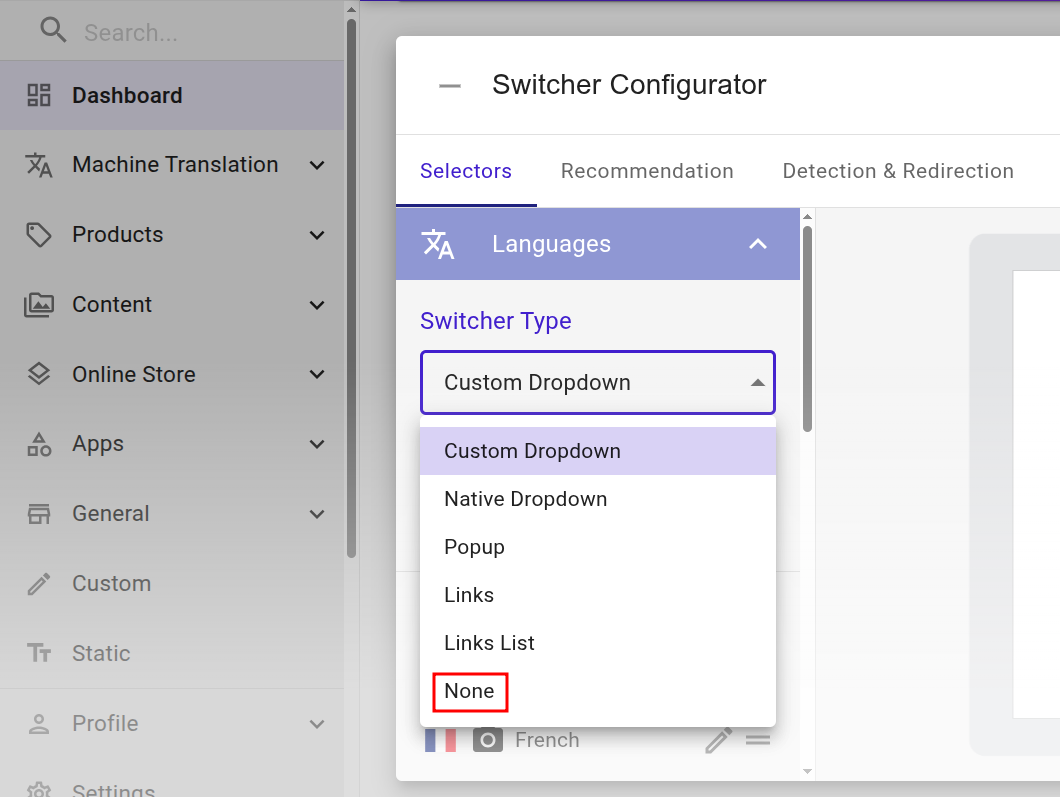
If the switcher still appears, make sure that the theme ID is correct in the langify embedded app section of your Shopify Theme Customizer.
Language Detection
If you are using langify's Automatic Language Detection to redirect visitors to their preferred language, please verify that the theme's native switcher still works as expected. We've tried to adapt our language detection to work alongside theme switchers, but since every theme is different, conflicts can occur.
If necessary, you can disable the langify language detection at langify > Dashboard > Switcher Configurator > Detection & Redirection.