
With langify you can apply machine translations to your store content. Depending on what you want to translate, you have options ranging from single-field translation to bulk translation.
There is no limit to how much content you can translate. The cost of machine translations is calculated based on the number of words that are to be translated. You can purchase word packages for machine-translations at any time. These costs do not add to the monthly subscription plan but are instead one-time purchases.
Langify Subscription
Depending on which langify plan you have subscribed to, you will have different options to work with machine-translations.
On the Basic plan you can apply machine-translations to individual items such as products, collections, articles etc.
On the Growth and Premium plan you additionally have access to langify's Bulk Translation tool which is able to translate most of your store with one click.
If you haven't decided on a langify subscription, please check our Plan Features Overview to see what features each plan offers.
You can add manual translations on any langify plan, even the Free plan. Also, you can edit the machine-translations at any time. This gives you complete control over your translations.
Translation Services
By default, langify uses DeepL for machine-translations. For the languages that are not supported by DeepL, it uses Google (Cloud Translation) instead.
Both services use AI‑based neural machine translation technology to deliver optimized results.
Important Notes
- Please be aware that the machine-translations tools will only apply translations when prompted. They will not automatically translate your store without your input.
- When translating legal texts, please keep in mind that machine translations may be inaccurate and could alter the intended legal meaning. Legal requirements can also vary significantly between countries and regions.
- Content in Shopify can be stored in a wide variety of formats. This includes common code like HTML, JS and CSS, but also Shopify's template language Liquid and the very complex JSON format. Due to this mix of different code, a machine translation might not always interpret the text correctly and it is possible that mistakes happen.
- Some content in your store, especially metafields, might be managed by third-party apps and as such can contain settings instead of normal text. Please leave these fields untranslated - otherwise the app might stop working properly.
- Before starting to translate, consider setting up a glossary to protect you brand names from being translated.
- Very short texts: Button labels and single words are the hardest to translate because context is missing (e.g. "Free", "Order", "Post").
After applying machine-translations to your store content, always double-check if your store is still working as expected.
Review before publishing
Some content deserves a closer look before it goes live:
- legally relevant texts
- payment, shipping, or return conditions
- product specifications where an incorrect meaning would be problematic
- safety notices and warnings
- important marketing or brand messages
Beyond the wording itself, check that your store still behaves as expected:
- General functionality: Can you still search for a product, add it to your cart, and check out?
- Text length: Translations are often longer than the original. Check whether your theme still displays everything correctly.
- HTML and placeholders: Despite our automatic protection, formatting may shift in exceptional cases.
Translation Tools
Generally, there are four ways to apply translations using langify. Below you will find a short outline of each method, going from the bulk-translation method to the manual translation path.
Bulk Translation
You can find the Bulk Translation tool by clicking the blue Bulk Translation button on the langify dashboard, or by navigating to Machine Translation in the sidebar and selecting Bulk Translation.
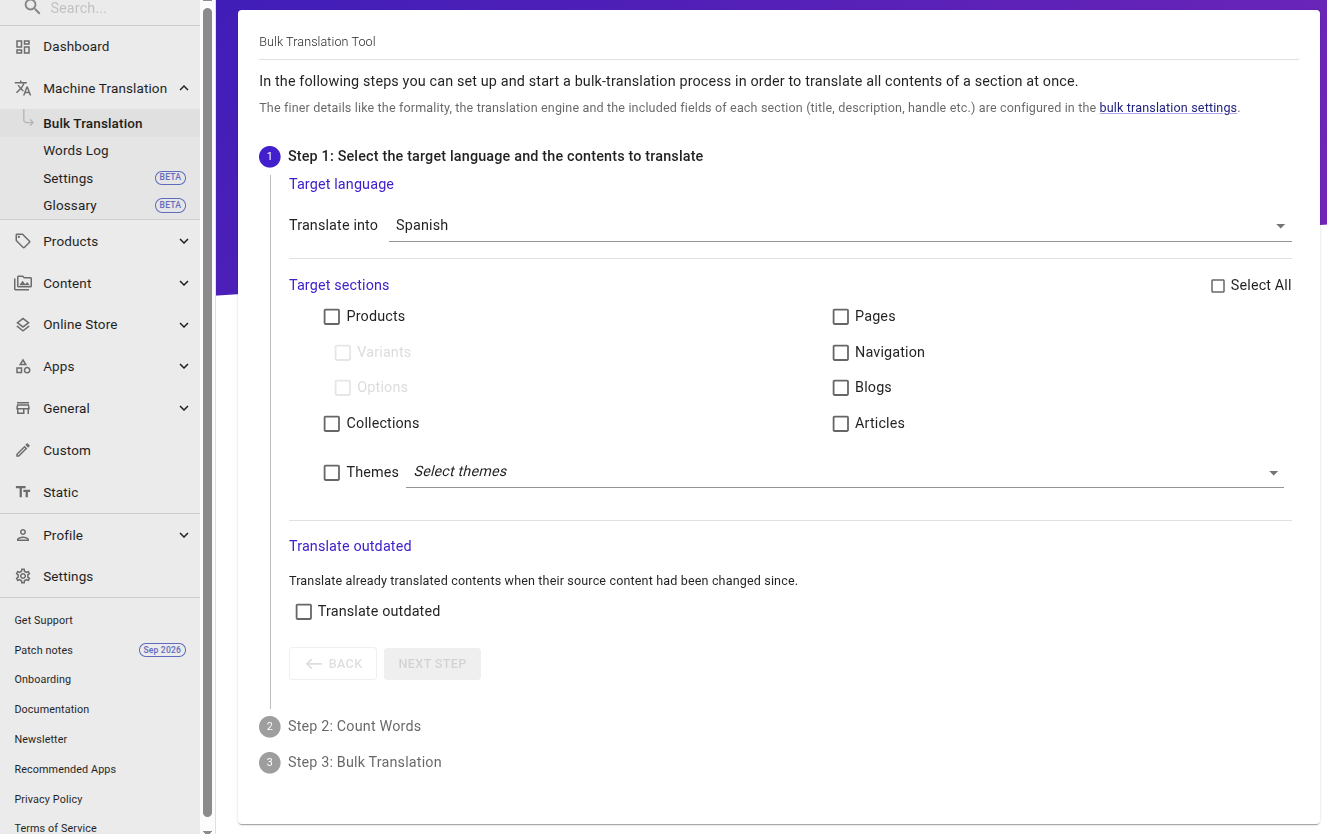
The Bulk Translation will lead you through a dialogue with 3 steps:
- Choose the language and categories you want to translate.
- Start the word-counting process.
- Start the translation.
For a complete overview of the Bulk Translation tool, please have a look at our guide How to bulk-translate your store with langify.
Individual Machine-Translation
If you only want to translate specific items, like one product or one collection, you can use the green "machine-translation" button. This button will appear above each section.
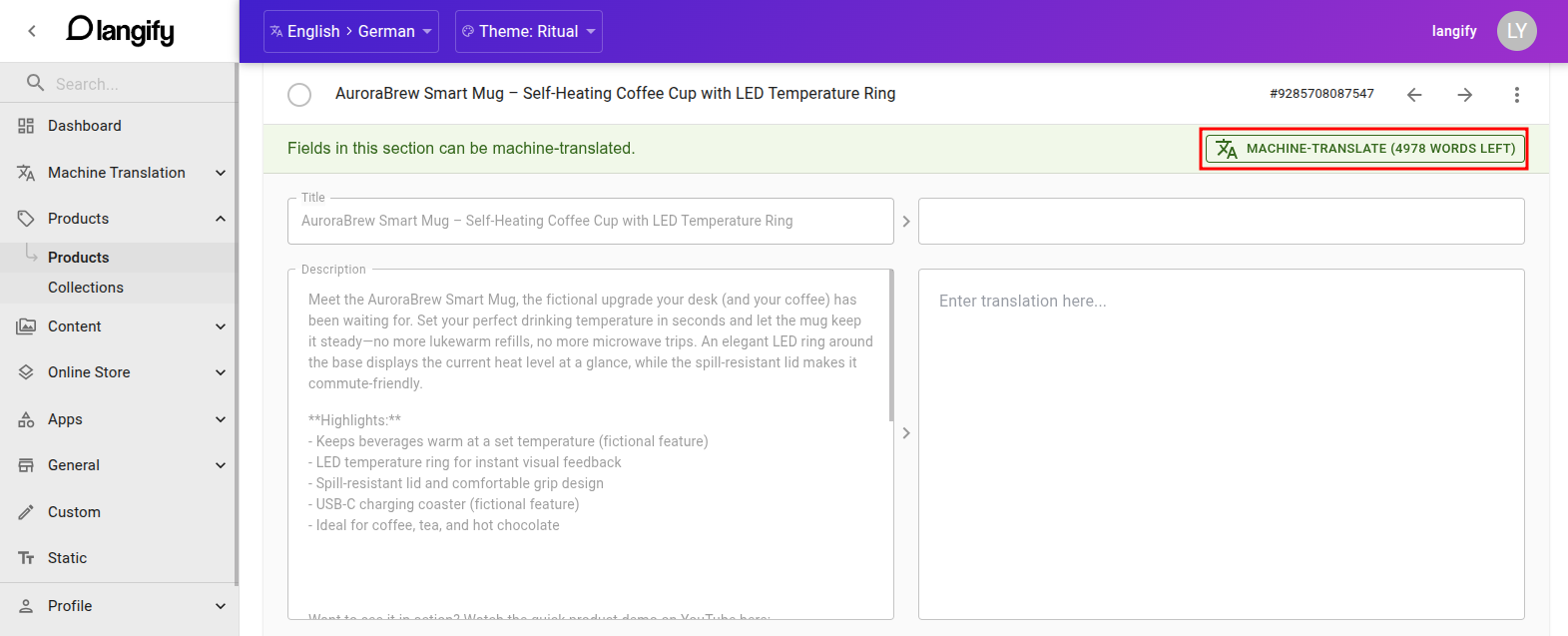
The machine-translate button translates the fields you have ticked in its menu. By default these are the untranslated fields only, so existing translations remain unchanged.
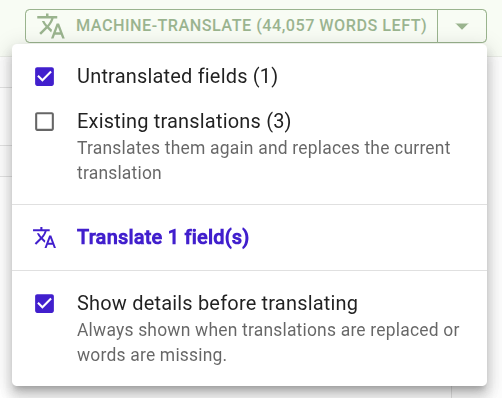
Click the arrow on the right of the button to open the menu. It is a checklist:
- Untranslated fields: Fields that do not have a translation yet. Ticked by default. If the section has no empty fields, this entry is greyed out.
- Existing translations: Translates these fields again and replaces their current translation.
- Translate … fields: Runs the translation for what you ticked. The count tells you how many fields it covers and how many existing translations it would replace.
The icon at the start of the button shows what the next run would do: a translate icon when it only fills empty fields, a replace icon when it would overwrite existing translations.
Before the words are spent, a dialog lists the fields, the word count, the cost and your balance afterwards. You can untick single fields there. For a plain run that only fills empty fields and fits your balance you can tick Don't show again; the dialog still appears whenever translations would be replaced or words are missing. Show details before translating in the button's menu brings it back at any time.
If you would like to include the metafields with the machine-translation action, please scroll down and open the "Metafield" tab before you click on the "machine-translate" button.
Machine-Translate Single Field
If you only want to translate one specific field, you can use the Machine-translate single field option.
This option can be found when clicking on three-dot icon to the right of any field:

This option can also be used to apply machine-translations in the Notifications section where the green "machine-translation" button is hidden.
Because Notifications are made up of three different types of code - HTML, CSS and Liquid - they can be particularly difficult to handle for machine-translations.
Manual translation
You can also manage your translations manually. This is useful if you're handling the translations by yourself or have hired a professional translator. This also allows you to edit the machine-translations at any time in case they need adjustment.
To manually edit the translations, simply open any item in langify and enter your translations on the right side.
Settings
Formality
You can adjust the formality for your machine translations at Machine Translations > Settings.
The formality setting is only available for languages translated via DeepL. For more information visit Machine Translation Settings
Translation Fields
At Machine Translations > Settings you can also in-/exclude specific fields from the Bulk Translation. For more detailed information, please check our guide Machine Translation Settings.
Glossary
You can also configure a glossary for your machine translations at Machine Translations > Glossary. For more information on this, please visit our guide Machine Translation Glossary.