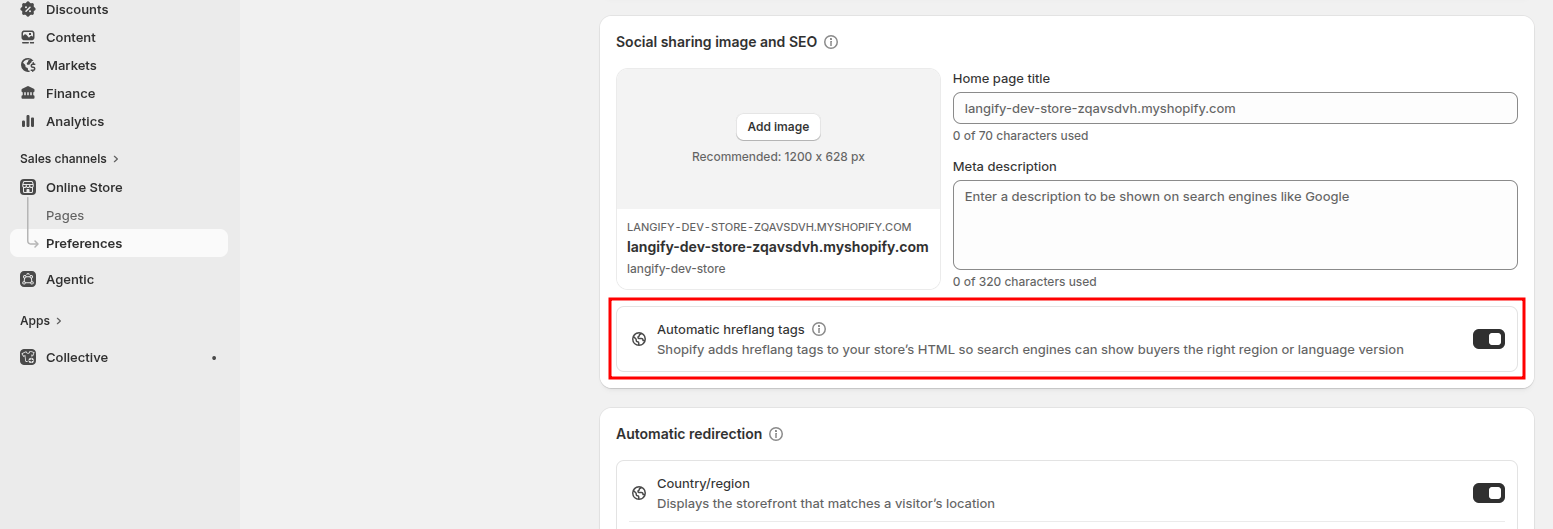
Hreflang tags are added automatically to your store pages the moment you publish your translation language and assign it to a market.
Hreflang tags are managed by Shopify and are generated based on your Shopify Markets settings. Our langify app does not have any direct influence on them.
You can double-check your hreflang tags with any SEO tool, such as technicalseo.com.
This is an example of how the hreflang tag scan should look:

What are Hreflang Tags?
Hreflang tags are small pieces of HTML code placed in the <head> of your store's pages. They tell search engines like Google which language and region each version of a page is intended for — and how all those versions relate to each other.
For example, if your store has an English version at mystore.com and a German version at mystore.com/de, hreflang tags signal to Google that these are the same page in different languages — not duplicate content. Google then serves the appropriate version to users based on their location and language settings.
Hreflang tags matter for anyone running a multilingual or multi-regional store. They help improve your visibility in local search results, reduce bounce rates by directing users to the right language version, and prevent your translated pages from competing against each other in search rankings.
Hreflang Tags and Shopify Markets
How your hreflang tags are structured depends on how your Shopify Markets are configured:
- Your primary market generates regionless hreflang tags — for example,
hreflang="en"— without a country code attached. - All other markets generate hreflang tags that signal both language and country — for example,
hreflang="de-DE"for German as spoken in Germany. - Exceptions apply for certain languages. Chinese, for instance, requires a region code in all cases (e.g.
zh-CNfor Simplified Chinese,zh-TWfor Traditional Chinese), since the written forms differ significantly by region.
For further reading, refer to Shopify's official guide on hreflang tags.
SEO Reports
If you use an SEO tool like Semrush, it may flag issues on all your product-within-collection URLs. These are URLs that contain both a collection and a product, for example: mystore.com/collections/women/products/shirt
This page will not reference itself in the hreflang or canonical tags. Instead, both the product-within-collection URL and the plain product URL (mystore.com/products/shirt) will point to the plain product URL as the canonical. This is intentional: the two URLs display identical content, and treating the product-within-collection URL as a separate page would create a duplicate content issue that could negatively impact your SEO ranking.
This behavior is managed by Shopify and is the correct, expected setup — you can safely disregard these particular flags in your SEO reports.
Can I Edit My Hreflang Tags?
The hreflang tags are not directly visible in your theme code. Instead, they are rendered as part of the global Shopify Liquid variable {{ content_for_header }}, which Shopify controls and outputs automatically.
Editing hreflang tags manually is not recommended. Doing so requires advanced knowledge of both Liquid templating and international SEO, and any changes would need ongoing monitoring in case Shopify updates its own output. In most cases, the automatically generated tags are correct and sufficient for a properly configured store.
Disable Automatic Hreflang Tags
Turning off automatic hreflang tags can negatively affect your store's SEO. Turn off this setting only if you have an alternative hreflang tag implementation in place.
If you don't want your hreflang tags to be created automatically, then you can disable this option at Shopify > Online Store > Preferences. To avoid impacts on your SEO, you need to add your own hreflang tags to your theme.